





LiFePO4 lithium batteries are gaining popularity due to their longer lifespan, lighter weight, higher energy density, faster charging speed, and other advantages over lead-acid batteries.
However, questions often arise about how to jumpstart a dead LiFePO4 battery and whether it’s possible to revive a dead lithium battery.
This guide provides practical insights and measures for reviving a dead lithium-ion battery, along with step-by-step instructions and tips to bring your devices back to life.
Table of Content
- Typical Signs of a Dead Lithium-Ion Battery
- Common Reasons Why Lithium LiFePO4 Batteries Die
- Essential Equipments Needed to Jumpstart A Dead Lithium Battery
- Ways to Jump Start a Dead Lithium Battery
- Preventive Measures to Avoid Depleting Lithium Batteries
- Maintenance Tips for Optimal Lithium Battery Performance
- FAQs about Jump Start LiFePO4 Lithium Batteries
Typical Signs of a Dead Lithium-Ion Battery
“Dead battery” refers to a lithium-ion battery that can no longer properly power a device. This may happen because the battery is drained, or because the battery has become damaged. Recognizing these signs can help you determine if your battery requires attention. Here are some common indicators to watch for:
Failure to Charge
One of the clearest signs of a "dead" lithium-ion battery is its inability to charge. If the battery still cannot be charged or shows no response after being connected to a charger with a lithium battery activation function, it is very likely that the battery has been damaged.
Zero Power
If a device powered by a lithium-ion battery will not turn on at all, it may indicate that the battery is fully drained. However, if the device still does not work after being plugged into a power source, the problem may lie with the device itself or the charging circuit, rather than the battery.
Rapid Discharge
Overheating or Swelling
In some cases, a dead or malfunctioning lithium-ion battery may show physical symptoms such as overheating or swelling. If you notice abnormal heat or visible expansion, exercise caution, stop using it immediately, place the battery on a safe, non-flammable surface, away from people and combustible materials. Contact a professional recycling facility for proper disposal as soon as possible.
If you notice one or more of these signs, this may indicate that your lithium-ion battery is simply drained, or that it has reached the end of its service life or become damaged. If the battery is only drained, normal charging should restore it. However, if it cannot be charged, discharges rapidly, performs unstably, overheats, or becomes swollen, stop using it and recycle it safely. Do not attempt to force-activate it.
Common Reasons Why Lithium LiFePO4 Batteries Die
LiFePO4 batteries are built- in BMS (battery management system) to protect. The battery is protected from abnormal conditions such as overcharging, over-discharging, and short circuits.
When a battery fails to work properly, it may be due to several possible causes. Understanding these causes can help you determine whether the battery simply needs to be charged or should be recycled.
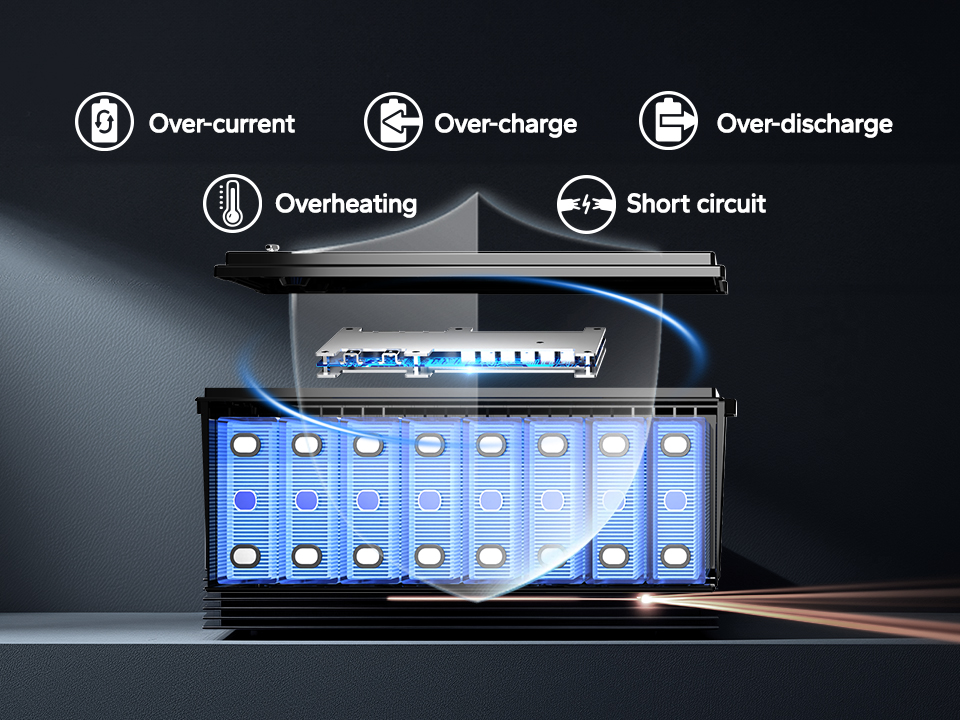
1.Normal Battery Drainage (Most Common)
Using up the battery’s charge during normal operation is the most common reason a battery becomes “dead.” In this case, the device may not turn on, or the battery level may show 0%. However, once connected to a charger, the battery charges normally and the device resumes operation. This situation only requires normal charging and is generally not a cause for concern.
2. Over Discharge
When the battery is discharged below the BMS protection threshold, the protection lockout may be triggered, causing the battery to have no output. In this case, it can usually be restored by using a charger with an activation function.
However, if the battery remains in an over-discharged state for a long time, such as being stored for several months without charging, it may suffer internal damage, capacity loss, or even become unusable.
3. Overcharging (When the BMS Fails)
The BMS in a LiFePO4 battery usually provides overcharge protection. Overcharging is only likely to occur if the BMS fails or an incompatible charger is used. Overcharging may cause swelling, leakage, or internal short circuits, and in severe cases, it may lead to fire or explosion.
4. Aging
Lithium-ion batteries undergo gradual aging due to chemical reactions that occur within the cells, even when they are not in use. This aging process is accelerated by factors such as high temperatures and high charge voltages. As a result, the battery's overall performance deteriorates, leading to a gradual decline in its ability to hold a charge and deliver power effectively.
Essential Equipments Needed to Jumpstart A Dead Lithium Battery
To jump-start a dead lithium-ion battery, you need the right equipment to "wake up" its protective Battery Management System (BMS) safely. The BMS shuts the battery off when the voltage drops too low, and using the correct tools is crucial to revive it without causing damage.
Let's check the list.
- Lithium-Compatible Charger: You must use a charger specifically designed for lithium-ion chemistry. Many modern lithium chargers include a "wake-up," "boost," or "0V" charging function that delivers a low, controlled current to safely reactivate a battery with BMS protection. Using a charger not made for lithium batteries can lead to overcharging, damage, or even a fire.
-
Multimeter: A multimeter is a vital diagnostic tool. Before you begin, use it to measure the battery's voltage.
- Safety Gear: Always prioritize safety. Wear protective gloves and safety glasses to shield yourself from potential electrical mishaps or chemical leaks. Having a fire extinguisher rated for electrical fires (Class C) nearby is a smart precaution.
Ways to Jump Start a Dead Lithium Battery
1. Utilizing a Charger with lithium activiation Function
In situations where a lithium battery has depleted, traditional charging methods may prove ineffective. One solution is to leverage a charger with a lithium activiation function. These specialized chargers are designed to kick-start the recharging process for batteries that have been completely drained, providing a targeted and effective approach to reviving the battery's functionality.
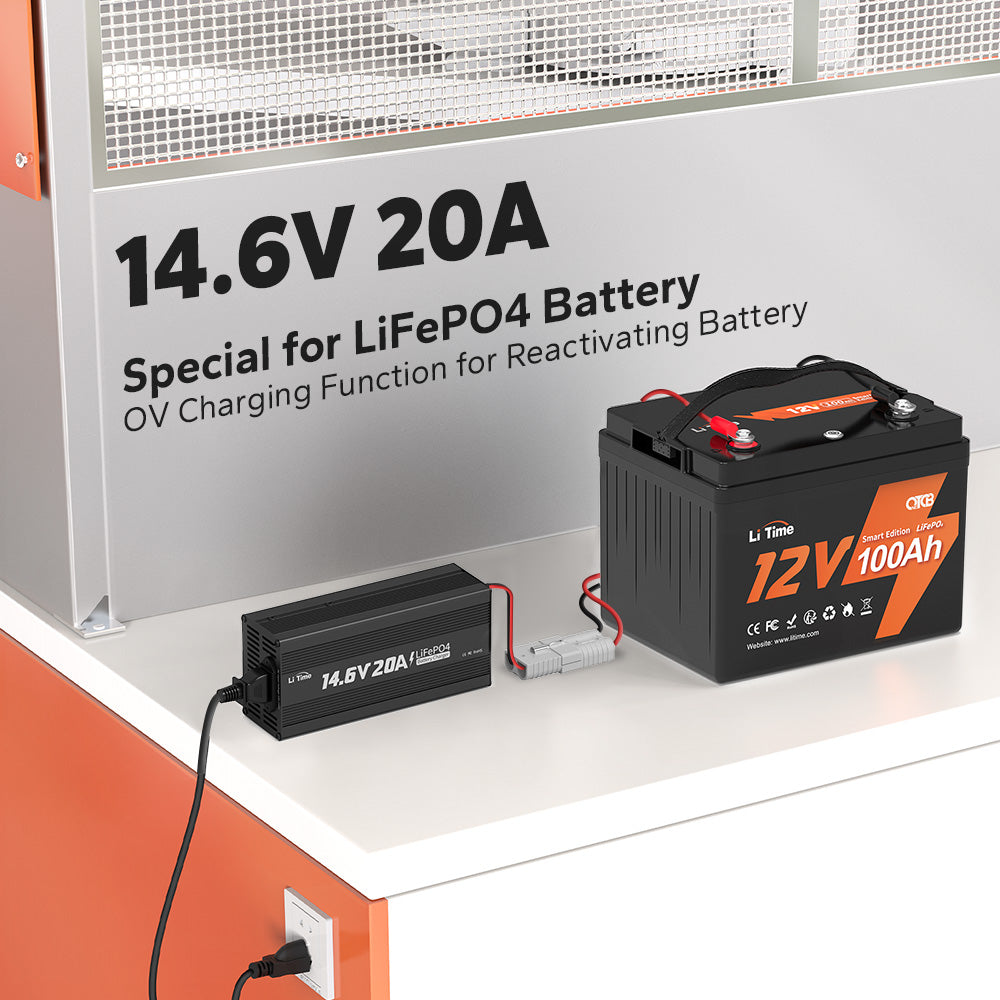
LiTime 12V 20Ah Lithium Battery Charger
By utilizing a charger with lithium activation capabilities, can detect and wake up a battery protected by the BMS and initiate the recharging process, breathing new life into a seemingly dead lithium battery.
2. Connecting a Controller that Supports Battery Charging
In conjunction with a specialized charger, connecting a MPPT solar charge controller that supports battery charging offers an alternative yet effective method for jump-starting a dead lithium battery with BMS protection. Provided that the controller is properly connected to the solar panels and there is sufficient sunlight.

Preventive Measures to Avoid Depleting Lithium Batteries
Avoid Complete Discharge: Even though lithium batteries can be fully discharged, however is still need to avoid regularly doing this as this can harm the battery's longevity. Try to charge the battery when its remaining capacity is around 20%. Read the Voltage of Lithium Batteries to know the relationships between voltage and SOC.

Optimal Storage Conditions: Store lithium batteries at room temperature in a dry environment. Extreme temperatures, both hot and cold, can negatively impact battery performance and lifespan.
Use Original Chargers: Always use the charger provided by the manufacturer or a compatible, high-quality charger to prevent overcharging or voltage irregularities that could damage the battery. Related reading: Can I charge LiFePO4 lithium battery with a normal charger?
Protect from Physical Damage: Be cautious with the battery and avoid subjecting it to physical shocks or impacts, as this can damage the internal components.
Regular Use: Even if for extended periods, you should also check the battery level regularly and charge it when necessary to prevent damage caused by over-discharge due to self-discharge. It is recommended to check it every three months.
Maintenance Tips for Optimal Lithium Battery Performance
Regular Charging: If not in use for long periods, make sure to charge the battery to 50% every three months to maintain a healthy charge level. This helps prevent deep discharges and maintains overall battery health.
Clean Contacts: Periodically clean the contacts of the battery and device with a dry cotton swab. This helps ensure proper electrical contact and avoids potential issues due to dirt or corrosion.
Temperature Monitoring: Be attentive to temperature concerns. Avoid using lithium batteries in extremely hot or cold environments, as this can affect battery performance and lifetime.
Conclusion
Jumpstarting a dead lithium-ion battery requires a careful approach and a focus on safety. Among the various methods discussed in this article, using a LiFePO4 battery charger with a lithium activation function or MPPT is the most recommended. This method stands out for its convenience and safety.
By understanding the characteristics of lithium-ion batteries and following the appropriate steps, it is possible to revive a battery with BMS protection safely. Always prioritize safety, and if you have any doubts about the condition of the battery, seek professional assistance. With the right approach, it's possible to breathe new life into a dead lithium-ion battery and continue enjoying the devices it powers.
FAQs about Jump Start LiFePO4 Lithium Batteries
1. What happens if I use a regular jump starter on a LiFePO4 battery?
Using a regular jump starter can send too much current to the battery, potentially causing overheating, permanent damage, or reduced lifespan.
2. What is the best way to charge a dead LiFePO4 battery?
The best way is to use a dedicated LiFePO4 battery charger with features like a lithium activation function or MPPT solar charger controller to safely restore the battery's charge.
3. How can I tell if my LiFePO4 battery is dead?
If the battery shows a significantly low voltage (below the manufacturer's specified cut-off voltage), or if devices powered by it do not function, the battery may be dead.
4. Can I jump-start my vehicle with a dead LiFePO4 battery?
It’s not advisable. Instead, consider using a compatible charger to revive the battery before attempting to start the vehicle.
5. What precautions should I take when jump-starting?
Always follow safety guidelines: ensure connections are secure, use the correct charger, avoid exposing the battery to extreme temperatures, and operate it in a well-ventilated area.
6. Can I jumpstart a lithium battery with a lead-acid battery?
Jumpstarting a lithium battery using a lead-acid battery is not advisable. The differing charging profiles and voltage requirements of these two battery types, using a lead-acid battery for jumpstarting can cause overcharging, potentially damaging or destroying the lithium battery.
7. Are there risks involved in jumpstarting a dead lithium-ion battery?
Yes, jumpstarting a dead lithium-ion battery poses several risks if not done correctly. Mishandling the battery, using incompatible chargers, or applying excessive current can result in battery damage, leakage, or even fire hazards. It's crucial to prioritize safety by adhering to recommended procedures, and if you're unsure, consider seeking professional assistance.


